Both are free. MySQL Workbench is Oracle's official MySQL design and administration tool. DB Connect is a ~35 MB native client for everyday querying, tuning and safe writes — on MySQL and MariaDB plus six more engines.

| Feature | DB Connect | MySQL Workbench |
|---|---|---|
| Price | Free | Free (Community Edition) |
| Platforms | macOS (universal), Windows x64 | Windows, macOS, Linux |
| Engines | MySQL/MariaDB, PostgreSQL, Redshift, DynamoDB, Redis, MongoDB, Elasticsearch/OpenSearch | MySQL |
| EER modelling, forward/reverse engineering | No — ER diagram from foreign keys, table designer, schema diff | Yes |
| Migration wizard from other databases | No | Yes |
| Server administration (users, config, start/stop) | Roles, sessions, kill | Yes |
| Visual EXPLAIN | Yes + EXPLAIN ANALYZE, before/after plan diff | Yes (Visual Explain) |
| Performance views | Live rates, connections, slow queries, full-scan drill-down, index health + workload advisor | Performance Dashboard and Performance Reports |
| Dry-run preview of UPDATE/DELETE | Yes | Safe Updates mode (blocks keyless UPDATE/DELETE) |
| Production confirmation gates, read-only connections | Yes | No |
| Backup / restore | mysqldump-based | Data Export / Import |
| SSH tunnels | Yes | Yes |
| AI assistant and local MCP server | Yes (your own Anthropic key) | Not built in |
| Source code | Private (free binary) | Open source (GPL) |
MySQL Workbench details as of 2026 — features and editions change, so check Oracle's MySQL Workbench page.
Design schemas as EER diagrams, forward-engineer them to SQL, reverse-engineer a live server into a model and synchronize the two. DB Connect draws an ER diagram from foreign keys for viewing; it is not a modelling tool.
Workbench can move schemas and data from other database systems into MySQL in a guided flow. DB Connect has no equivalent.
Users and privileges, server status, options file, startup and shutdown, logs — Workbench is built to administer a MySQL server, not just query it.
It runs on Linux, it is open source, and it comes from the team that builds MySQL. DB Connect is macOS and Windows only for now.
MySQL and MariaDB alongside PostgreSQL, Redshift (provisioned and serverless), DynamoDB, Redis, MongoDB and Elasticsearch/OpenSearch — one connection list, one history, one set of shortcuts.
Preview an UPDATE or DELETE as before/after rows inside a rolled-back transaction before you apply it. Per-tab transactions, read-only connections and confirmation gates on production-tagged connections.
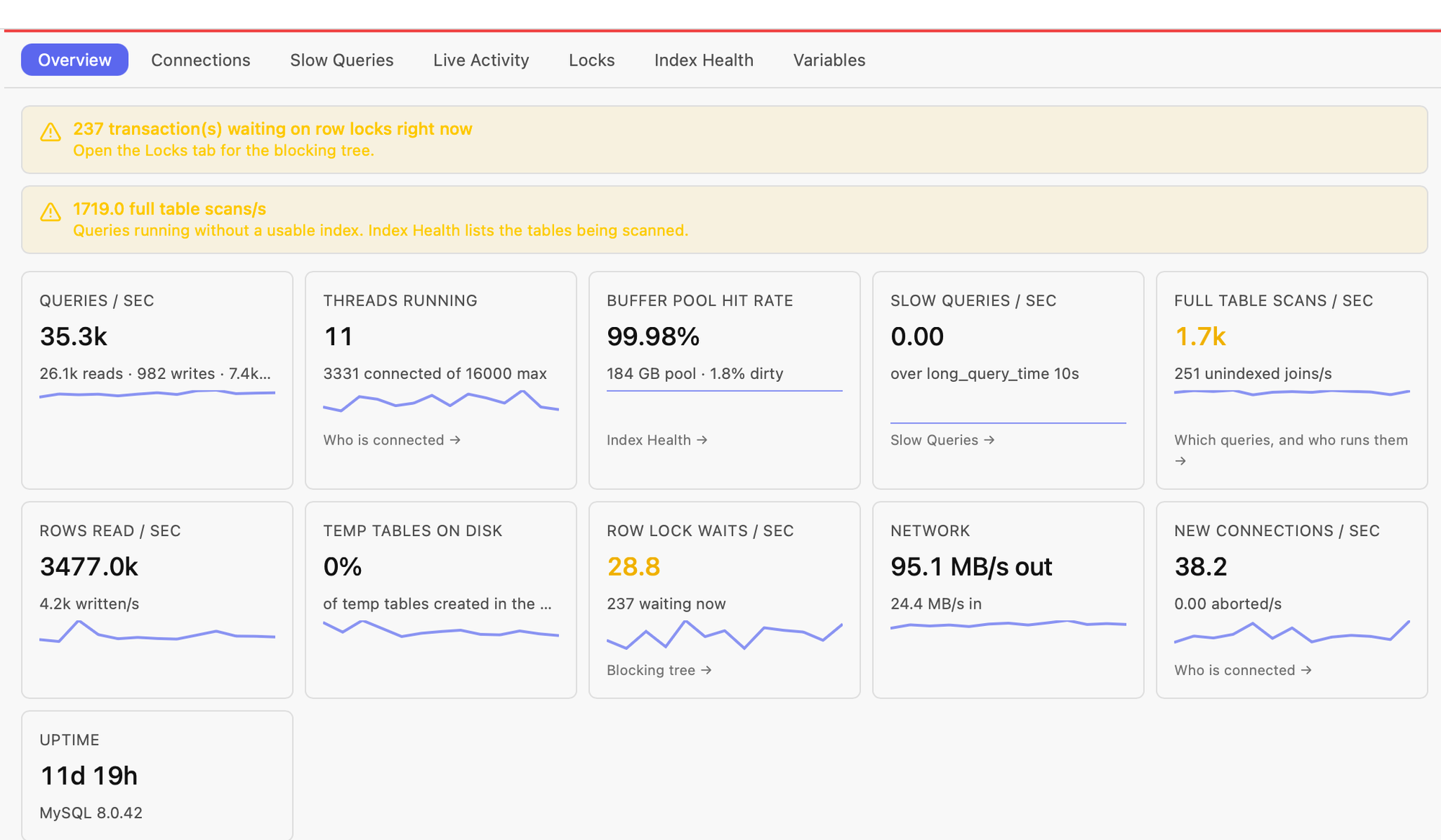
Live rates, connections and slow queries; click the full-table-scan tile to see which statements ran without an index and who ran them. Index health plus a workload advisor that proposes indexes from real queries.
Alias-aware autocomplete, JOIN … ON suggestions from foreign keys, signature help, visual EXPLAIN and EXPLAIN ANALYZE. Results grid with inline edit, find, charts, PII masking and streaming export.
An optional assistant using your own Anthropic API key (rows never sent by default, never from production), and a local MCP server so Claude Code, Claude Desktop or Cursor can query allow-listed connections.
A ~35 MB native app (Go + Wails). No account, no telemetry; credentials are AES-256-GCM encrypted with the key in your OS keychain.
you design schemas as EER models, migrate other databases into MySQL, administer MySQL servers day to day, or work on Linux.
MySQL is one of several databases you touch, you want dry-run previews and production gates on writes, you want to find unindexed queries fast, or you use Claude with your databases. Plenty of people keep Workbench for modelling and use DB Connect for daily work.
Yes. DB Connect is a free native MySQL and MariaDB client for macOS and Windows with no account and no telemetry. It also connects to PostgreSQL, Amazon Redshift, DynamoDB, Redis, MongoDB and Elasticsearch/OpenSearch. On a Mac, Sequel Ace is another free, open-source MySQL-only option.
Aurora MySQL speaks the MySQL protocol, so you add it as a MySQL connection using the cluster or instance endpoint, with SSL or an SSH tunnel through a bastion. Performance views that read performance_schema need it enabled on the instance.
Not fully. DB Connect generates an ER diagram from foreign keys and has a table designer and a schema diff that produces a migration script, but it is not a modelling tool. If you design schemas as EER models and forward- or reverse-engineer them, keep MySQL Workbench for that.
Yes, MySQL and MariaDB are both supported. The server version and flavour are detected on connect, so features are gated rather than failing; for example EXPLAIN ANALYZE is offered on MySQL 8.0.18 and later, not on MariaDB.
Not yet. DB Connect runs on macOS (universal, Apple Silicon and Intel) and Windows x64. A Linux build is on the roadmap. MySQL Workbench does run on Linux.
No. DB Connect is free for personal and commercial use, but its source is private; the distribution repository on GitHub is public. MySQL Workbench Community Edition is open source under the GPL.
Free for personal and commercial use. No account required.
macOS 11.0 (Big Sur) or later
Intel & Apple Silicon
xattr -cr /Applications/DBConnect.app
Prefer Homebrew? brew install --cask shubhesh07/db-connect/db-connect