A free MySQL GUI for Mac and Windows that also shows you why the server is slow
DB Connect is a native MySQL client: about 35 MB, no account and no telemetry. Its editor knows your schema, it lets you preview writes before they land, and its Performance pane takes you from a CPU spike to the query behind it. It works with MySQL, MariaDB, Amazon RDS and Aurora MySQL.
brew install --cask shubhesh07/db-connect/db-connect
curl -fsSL https://github.com/shubhesh07/db-connect/releases/latest/download/install.sh | bash
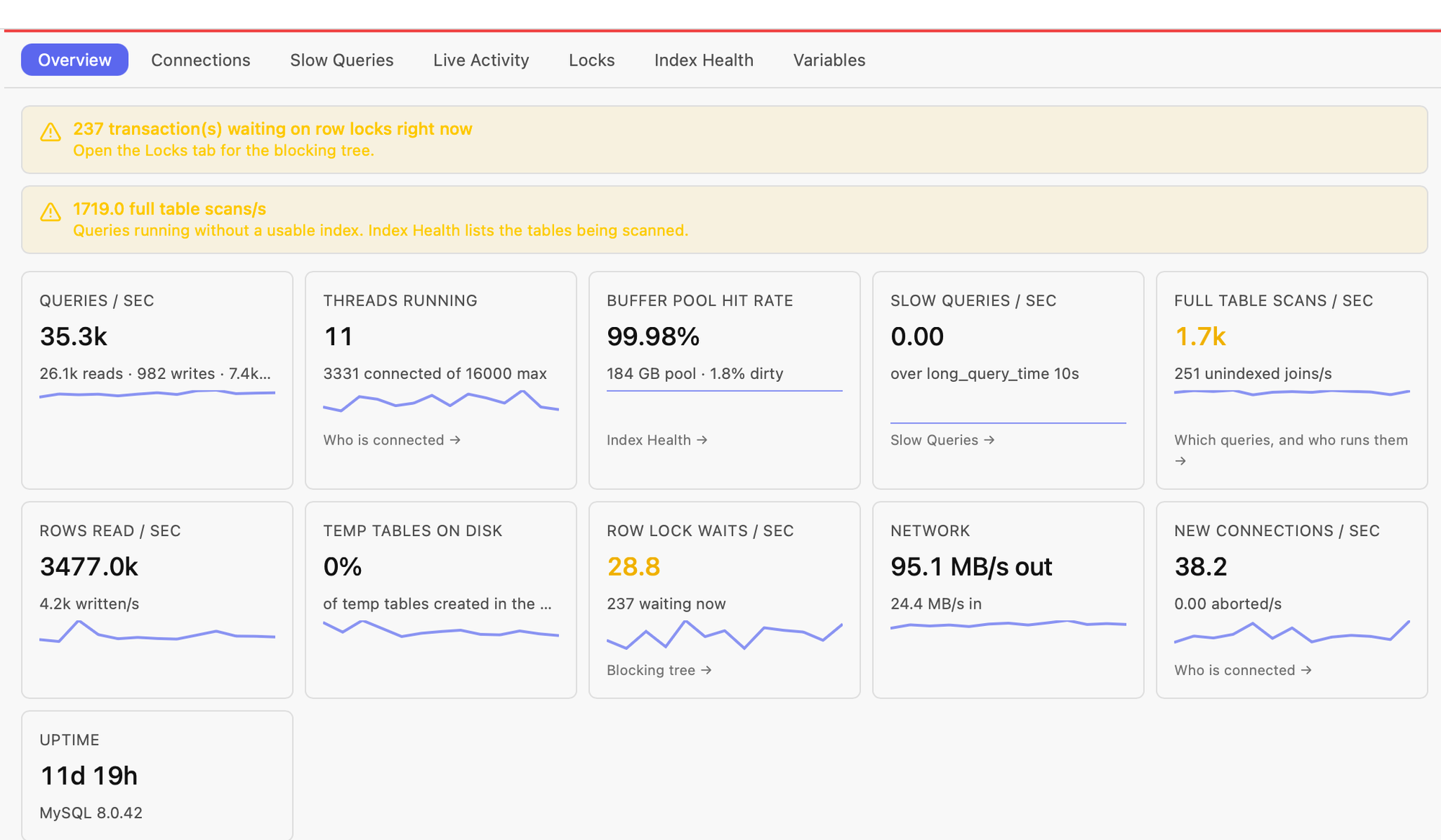
Performance → Overview on a live MySQL 8 server. Each tile links to the tab or query list behind it.
Everything a MySQL client should do, plus the parts most skip
Autocomplete that resolves aliases
o. lists the columns of whatever table is aliased o anywhere in the statement, including CTEs, derived tables, INSERT targets and UPDATE … SET. After ON it suggests the matching foreign-key pairs. Signature help and hover cover functions like IFNULL( and DATE_FORMAT(.
Run the current statement, or Run All
Cmd+Enter runs the selection or the statement under the cursor. Cmd+Shift+Enter runs every statement on one pinned connection, so SET @x, temp tables and session settings carry across. The statement scanner understands DELIMITER for procedures and triggers, and CALL shows every result set.
Visual EXPLAIN and EXPLAIN ANALYZE
A plan tree for any query. On MySQL 8.0.18+, EXPLAIN ANALYZE shows measured time per operator, actual rows and loops. Save a plan as a baseline, change an index and re-run: you get a per-table diff of access type, key and rows examined, with an improved or regressed verdict.
Dry-run UPDATE and DELETE
Preview a single write inside a transaction that's rolled back: the affected rows, before and after values, and the row count. Pre-flight lint flags DELETE or UPDATE without a WHERE while you type.
A results grid you can edit
Inline edit, insert and delete. Apply opens the generated SQL in an editable dialog before anything runs. There's also find (Cmd+F), copy as INSERT or JSON, selection stats, charts, foreign-key click-through and PII masking.
Performance pane
Overview samples every 5 seconds and shows real rates: queries/s split into reads, writes and prepared statements, plus threads running, buffer-pool hit rate, slow queries, full table scans, temp tables on disk and row lock waits. Connections groups sessions by user@host and flags idle in transaction. There are also tabs for Slow Queries, Live Activity, Locks and Index Health.
Workload index advisor
Index Health → Workload reads your slow-query digests, proposes composite indexes with the expected gain, and lets you trial each one as an invisible index before you create it for real.
Designers and admin
The table designer (CREATE and ALTER) keeps the full column definition: UNSIGNED, charset, ON UPDATE, GENERATED. It also handles foreign keys. You also get an index manager (including functional, prefix and DESC indexes), a partitions view, MySQL 8 roles, users and privileges, ANALYZE/CHECK/OPTIMIZE TABLE, and Where is this used? before you drop anything.
Schema diff and ER diagrams
Diff two connections and get a migration script in either direction, with DROPs opt-in. ER diagrams are drawn from your foreign keys: right-click a database, then pan, zoom and click through.
Backup, restore, import, export
mysqldump-based backup and restore, including schema-only. Exports to CSV, JSON or XLSX stream straight to a file. CSV import runs in one transaction and treats empty cells as NULL.
Connect anywhere, safely
SSH tunnel (with keepalive and ssh-agent support), SSL with a custom CA and client certificate, and read-only connections. Connections tagged production ask for confirmation before destructive statements and before every mutating action. Credentials are AES-256-GCM encrypted, with the key in your OS keychain.
AI on your terms
Ask (⌘⇧A) drafts, explains and fixes SQL from your live schema, using your own Anthropic key. A local MCP server lets Claude Code, Cursor and other MCP clients run read-only queries on connections you allow-list. Writes need a time-bounded grant from the desktop app.
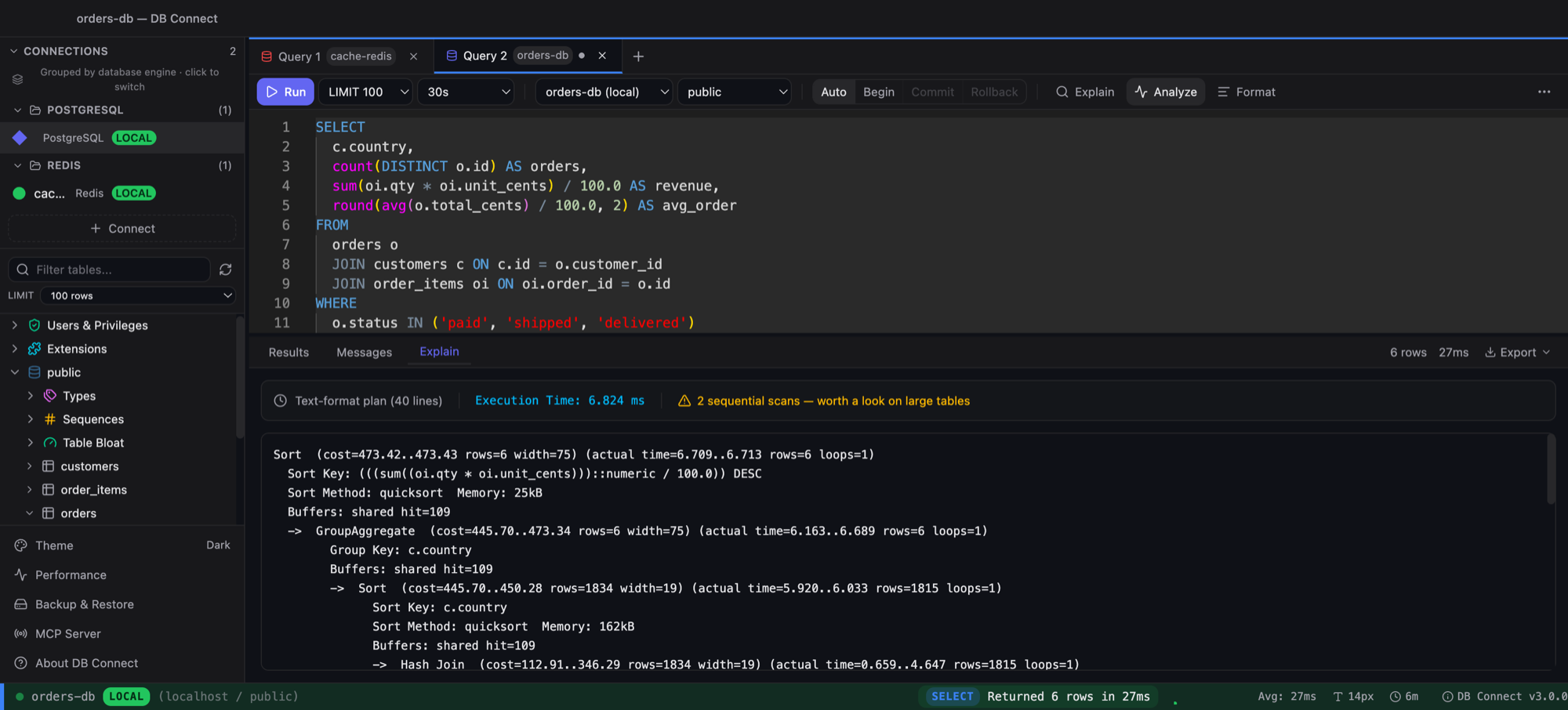
The Explain tab. This capture is from a PostgreSQL connection; on MySQL 8.0.18+ the same Analyze button shows measured time per operator, actual rows and loops.
A MySQL Workbench and Sequel Ace alternative: how it compares
MySQL Workbench is Oracle's official free client and is solid if MySQL is all you use. Sequel Ace is a free, open-source client for macOS. DBeaver and TablePlus cover many engines. Here is the comparison as fairly as I can make it:
| DB Connect | MySQL Workbench | Sequel Ace | DBeaver Community | TablePlus | |
|---|---|---|---|---|---|
| Price | Free | Free (Community) | Free, open source | Free (Community) | Paid licence; limited free tier |
| macOS app | Native (Go + system webview) | Yes | Native, macOS only | Java (Eclipse) | Native |
| Windows | Yes (x64) | Yes | No | Yes | Yes |
| Linux | Not yet | Yes | No | Yes | Check vendor* |
| Server performance overview | Yes (rates, connections, index health) | Yes (Performance Dashboard)* | No | Limited* | No* |
| Dry-run UPDATE / DELETE | Yes | No* | No | No* | No* |
| AI assistant | Yes (your Anthropic key) | No* | No* | Check vendor* | Check vendor* |
| Local MCP server | Yes (allow-listed, read-only by default) | No* | No* | Check vendor* | Check vendor* |
| Other engines in the same app | PostgreSQL, Redshift, DynamoDB, Redis, MongoDB, Elasticsearch/OpenSearch | MySQL only | MySQL / MariaDB only | Many | Many |
* As of 2026. These products change often, so check each vendor's site before you decide. Corrections are welcome: open an issue.
Frequently asked
Is there a free MySQL GUI for Mac?
Yes. DB Connect is free for personal and commercial use, runs natively on macOS (one universal build for Intel and Apple Silicon) and on Windows x64, is about 35 MB, and needs no account. Install it with brew install --cask shubhesh07/db-connect/db-connect or download the DMG.
What is a free alternative to MySQL Workbench?
DB Connect covers the everyday Workbench jobs: a SQL editor, visual EXPLAIN, table and index designers, users and roles, mysqldump backup and restore, and a server performance view. It adds dry-run previews for UPDATE and DELETE, schema diff, a workload index advisor, and PostgreSQL, Redshift, DynamoDB, Redis, MongoDB and Elasticsearch/OpenSearch in the same app. Workbench is still the better pick if you need Linux or its data-modelling tools.
Is there a Sequel Ace alternative for Windows?
Sequel Ace only runs on macOS. DB Connect runs on macOS and Windows with the same features, and keeps credentials encrypted with the key in the OS keychain (macOS Keychain or Windows Credential Manager) on both.
Does it work with MariaDB, Amazon RDS and Aurora MySQL?
Yes. It connects over the MySQL protocol, with SSL, a custom CA or client certificate, and SSH tunnels for databases that sit behind a bastion. The server version is probed on connect: EXPLAIN ANALYZE needs MySQL 8.0.18 or newer, so it isn't offered on MariaDB or older MySQL.
How do I find which MySQL queries are using the most CPU?
Open Performance, then Overview. The tiles show real rates for queries, rows read, full table scans and unindexed joins. Click the full-table-scan tile to see the statement digests that ran without a usable index, who runs them and a sample statement, then send one to the editor for EXPLAIN or EXPLAIN ANALYZE. The CPU case study walks through it.
Can I preview an UPDATE or DELETE before running it?
Yes. Preview runs a single UPDATE or DELETE inside a transaction that is rolled back, and shows the affected rows, before and after values, and the row count. Apply then runs the real statement, and asks for confirmation on production connections.
Does the AI assistant send my data anywhere?
The assistant uses your own Anthropic API key, which is stored encrypted. It sends your schema (tables, columns, keys and sampled types) with your question. Rows are never sent by default, and never from production connections. The MCP server is local, off by default, and only reaches connections you allow-list.
Free. Native. No account.
macOS (Intel + Apple Silicon) and Windows x64, about 35 MB. Also available via brew install --cask shubhesh07/db-connect/db-connect.